A step-by-step AI visibility test you can run on any client in about 20 minutes, using free tools, so you can show them where they stand in ChatGPT, Gemini, Perplexity and Google AI Overviews.
"Are we showing up in ChatGPT?" is becoming one of the most common questions agencies get from clients. Here's the test we run in our webinars and client calls. It takes about 20 minutes, uses free tools, and gives you something concrete to show the client.
Step 1: Write five questions a real customer would ask (3 minutes)
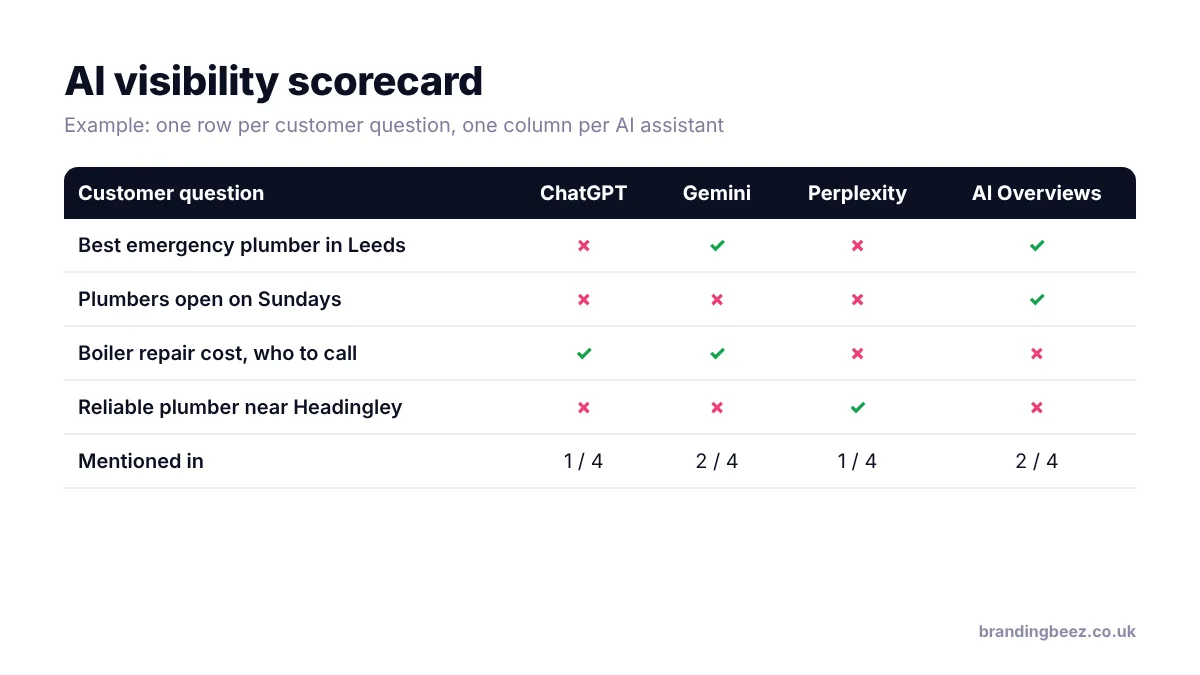
Don't start with the client's brand name. Start with the questions their customers ask before they know who to buy from. For a plumber in Leeds, for example:
- "Who is the best emergency plumber in Leeds?"
- "Which plumbers in Leeds are open on Sundays?"
- "How much does a boiler repair cost in Leeds, and who should I call?"
- "Recommend a reliable plumber near Headingley."
- "What do people say about [client name]?" (this is the only branded one)
Mix "best", "near me", price and comparison questions. Those are the moments AI tools name specific businesses.
Step 2: Ask the AI tools, logged out (8 minutes)
Run each question through ChatGPT, Gemini, Perplexity and a Google search (for AI Overviews). Use a private or logged-out window where you can, so past conversations don't skew the answers.
For each answer, note three things in a simple table:
- Mentioned? Is the client named at all?
- Who else is named? These are the competitors AI tools currently trust.
- Which sources are cited? Perplexity and AI Overviews show links. These are the directories and articles you need the client to appear on.
Step 3: Check what AI tools can read on the site (5 minutes)
- Structured data: paste the homepage URL into the Schema Markup Validator. Look for an Organization or LocalBusiness type with name, address, phone and
sameAslinks. - Plain-text facts: view the page source and search for the main service and town. If they only appear inside images, sliders or animated counters, AI crawlers may miss them.
- Crawler access: open
/robots.txtand make sure it isn't blocking AI crawlers such as GPTBot, ClaudeBot or PerplexityBot (unless the client chose to).
Step 4: Check the branded answer for mistakes (2 minutes)
Ask "What do you know about [client name]?" In our sessions, a surprising number of businesses found AI tools stating wrong services, old addresses or outdated information. Every error is a fix you can offer: correcting the source the AI took it from, which is usually an old directory listing or a stale page.
Step 5: Turn it into a client conversation (2 minutes)
Summarise in three lines:
- "You were named in X of 20 answers. [Competitor] was named in Y."
- "AI tools are citing these sites, and you're not on them: …"
- "Here are the three fixes we'd make first: …"
That is a much easier conversation than "we should do some SEO". It's specific, visual and tied to something the client has probably already tried themselves.
Doing this across your whole client list
Running the test once is easy. Running it every month for 20 clients, across four AI tools, with tracked prompts and competitor share, is where it becomes work. That's why we offer it as a white-label service: we run the tracking and fixes, and you send the report under your brand.
Skip the manual work for your first client: we'll run this check for free and send a white-label report you can share.
Request a free checkReady to Get Started?
Contact our expert team to discuss how we can help grow your business with proven digital marketing strategies.